Network
The following connectivity options are available in the welcome screen:
- WiFi (on every board)
- Cellular (on every board)
- LoRa (for users having the corresponding shield)
- Satellite (for users having the corresponding shield)
Starting from firmware version v3.4.0, a “No Network” option is also available. In this mode, the node only stores the measurements locally. These can be retrieved manually at any stage following this guide.
WiFi
Network Configuration
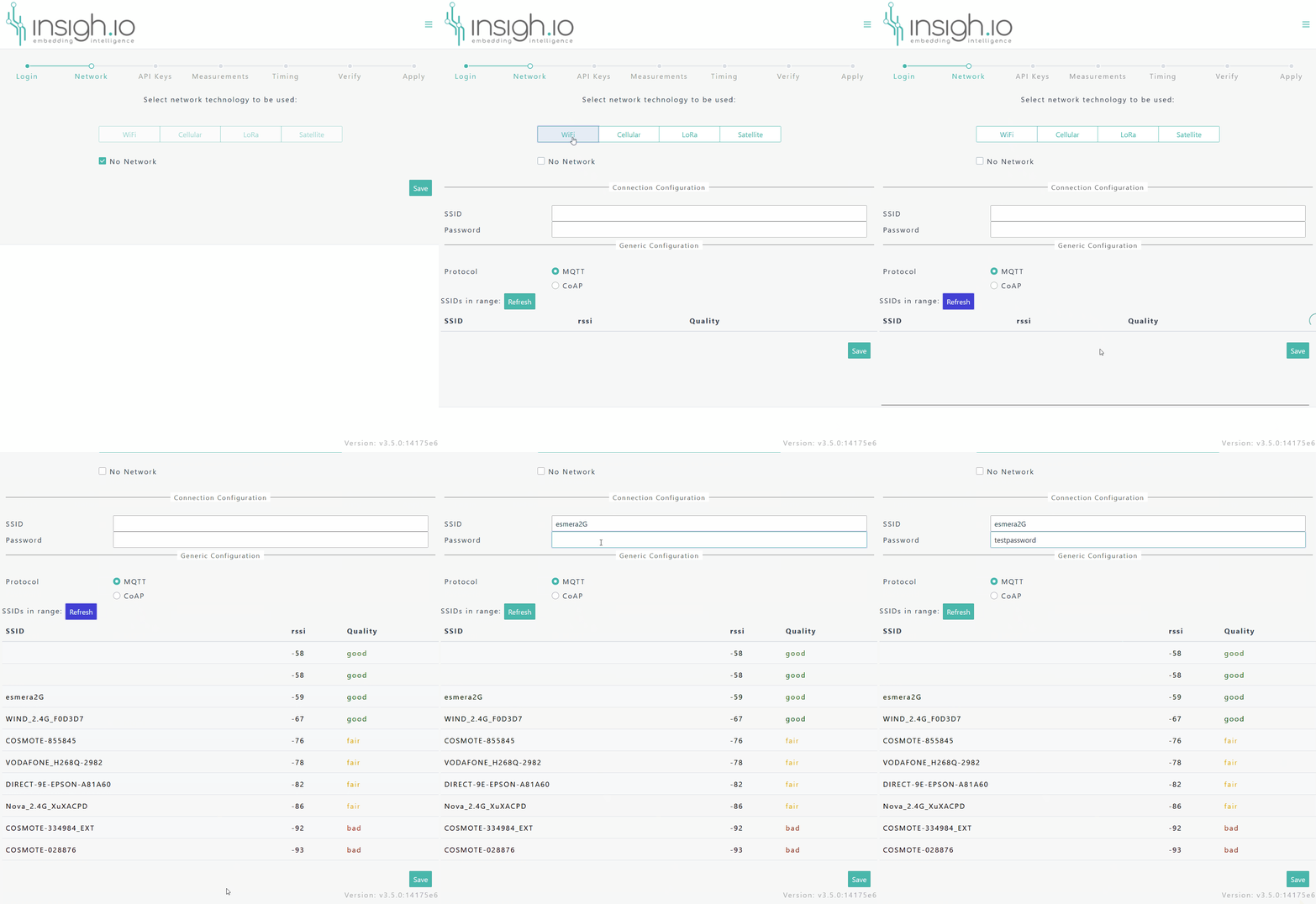
- Press the Refresh button to search for networks in range.
- Select the target network from the list. The
SSIDfield in the Connection Configuration panel is automatically populated. - Provide the WiFi
Password. - Hit Save to apply the configuration.
In case the target network is hidden, the user can provide the SSID explicitly.
Only 2.4 GHz WiFi networks are supported.
General Configuration
| Parameter | Value | Default Value | Comments |
|---|---|---|---|
Protocol |
[MQTT][CoAP] |
MQTT | MQTT is the preferred protocol. Change the transport protocol to CoAP only when losing a measurement is not that critical. |
The following short video shows how to do a fresh wifi network configuration.
Cellular
Mandatory Configuration
Connection Configuration Panel
| Parameter | Value | Default Value | Comments |
|---|---|---|---|
APN |
Operator-defined | iot.1nce.net | Consult your SIM provider or keep the default value for pre-provided 1nce SIM cards |
Technology |
[NBIoT][GSM][auto] |
NBIoT | Use NBIoT for optimal energy consumption and performance in low signal conditions. Use GSM only if there is definite knowledge that NB-IoT is not supported in the given area, as it provides the worst energy consumption. Use auto for all other cases. |
Starting from firmware version v2.6.8, there is no actual technology “locking”. Instead, with the technology parameter, we actually set a search preference order.
Optional Configuration
| Parameter | Value | Default Value | Comments |
|---|---|---|---|
MCC/MNC |
Operator-defined | – | Consult your SIM provider. Explicit MCC/MNC forces operator locking when using a global SIM card. Used mostly for speeding up NBIoT connection. |
General Configuration
| Parameter | Value | Default Value | Comments |
|---|---|---|---|
Protocol |
[MQTT][CoAP] |
MQTT | Use mandatorily CoAP when the Opetator allows only UDP traffic. CoAP provides lighter byte exchange but at the expense of reliability. |
IP version |
[IPv4][IPv6][IPv4/v6] |
IPv4 | Consult the Operator. This is mostly used in NBIoT, as some operators tend to allow only IPv6 traffic over their NBIoT networks. Otherwise leave default IPv4 setting. |
Debug Menu: Test Modem Connection
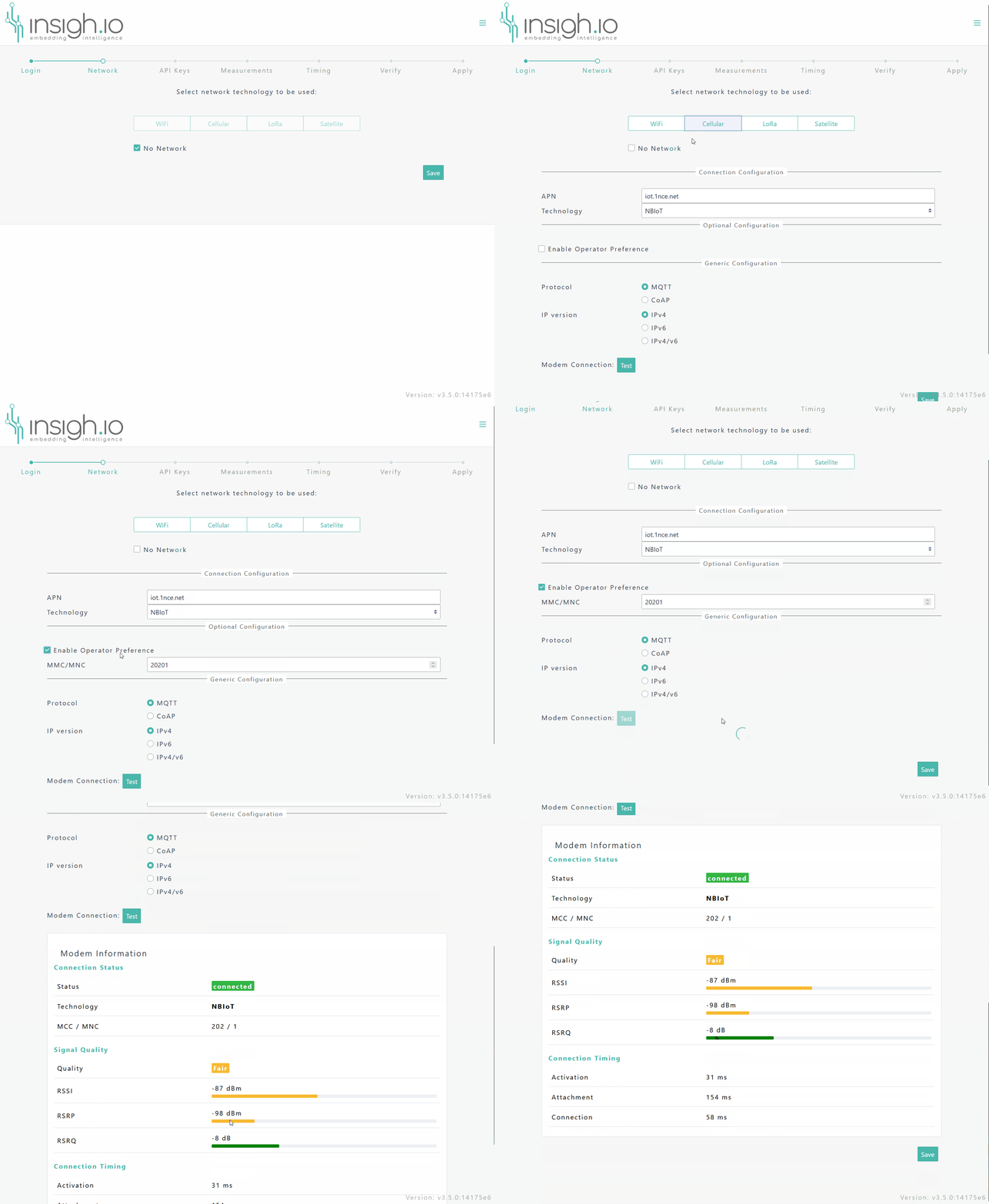
Starting from firmware version v3.4.0, a Modem Connection test can be performed during Configuration, by pressing the “Test” button. This will output the following modem information:
The following short video shows how to do a fresh Cellular network configuration and an example output from the test modem connection functionality.
LoRa
LoRa-related network configuration is split into 2 steps.
Connection Configuration
| Parameter | Value | Default Value | Comments |
|---|---|---|---|
Region |
Regions supported by the RAK3172(H) module | EU868 | Consult the official module documentation |
DR |
[0]-[7] | 5 (SF7/125kHz) | LoRa Data Rate Setting |
TxRetries |
Integer | 1 | Max number of uplink transmission retries when Confirmed Mode is enabled |
ADR |
Enabled/Disabled | Enabled | LoRa Adaptive Data Rate Mode (check with LNS) |
Confirmed |
Enabled/Disabled | Enabled | Enable Confirmed or Unconfirmed UL transmissions |
LoRaWAN Keys
| Parameter | Value | Default Value | Comments |
|---|---|---|---|
DEV_EUI |
16 char HEX | - | Device Extended Unique Identifier: Provided by insigh.io. It can also be retrieved from the radio module (inspect the module label or scan the QR code) |
APP_EUI |
16 char HEX | 0000000000000001 | Application Extended Unique Identifier EUI: Should match the App EUI entered in the LNS |
APP_KEY |
32 char HEX | - | Application Key: Should match the App Key entered in the LNS |